Download and Install
Autodesk Maya 2024-2026
The Rigonomicon.com is dedicated to teaching the fundamentals of rigging to anyone interested in bringing characters to life and empowering creators with methods that are as software agnostic as possible. That being said, we currently only provide tools for Autodesk Maya, although we hope to provide tools for other DCCs in the future.
Using the Rigonomicon Maya Shelf
This video includes detailed instructions on how to use each tool in the Rigonomicon’s Maya shelf.
It is recommended to start with the basics and have an understanding of the golden rules of rigging before watching this video.
Download
All releases and source code can be found here: GitHub – Rigonomicon/Maya
| Operating System | Latest Release (Maya 2024-2025) |
|---|---|
| Windows64 | Rigonomicon Win64 0.4.0 Alpha |
| MacOS | Rigonomicon_MacOS_0.4.0_Alpha |
| Linux | Rigonomicon_Linux_0.4.0_Alpha |
Installation
Windows64
Extract the contents of the latest release into the “\Documents\maya\modules” folder found in your Documents folder. If the folder “modules” does not exist, please create it. Make sure to remove any prior versions of the tools. Please note that all versions of Maya are included in this module so you do not need to install the tools for the individual versions of Maya.
MacOS

- Make sure your Finder can “Show Library Folder” in your preferences.
- Go to your “Home” folder.
- Extract the contents of the latest release into the “/Library/Preferences/Autodesk/maya/modules“. If the folder “modules” does not exist, please create it. Make sure to remove any prior versions of the tools. Please note that all versions of Maya are included in this module so you do not need to install the tools for the individual versions of Maya.
Linux
Note: Autodesk recommends CentOS, Rocky, or a RHEL distro)
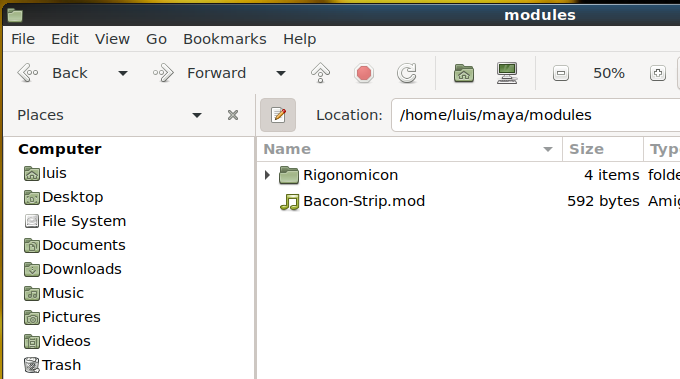
- Go to your “Home” folder.
- Extract the contents of the latest release into the “/maya/modules” folder. If the folder “modules” does not exist, please create it. Make sure to remove any prior versions of the tools. Please note that all versions of Maya are included in this module so you do not need to install the tools for the individual versions of Maya.
About our Plugins and Scripts
The Rigonomicon uses Bacon-Strip (a.k.a.: Bake and Strip ) plugins at its core. These plugins were written in C++ by the creator of the Rigonomicon with the primary purpose of optimizing and simplifying the rigging process. It is common to find “traditional” Maya rigs that have thousands of nodes and use work-around methods to solve common rigging problems. The Bacon-Strip approach is to take as much advantage of all the multi-threading and GPU acceleration improvements that Maya has received over the years by means of writing optimized graph nodes that do the heavy lifting. This has the added advantage of being easier to understand and easier to fix when things break.
As for scripting, we have decided to rewrite our tools to adhere to Maya.cmds methods. Although it is preferable to use a more object oriented and pythonic scripting language like PyMel, Autodesk has made it clear that it will no longer include PyMel in Maya’s installer nor will it support it in any way since it is developed by a third party. This means that Rigonomicon scripts will work with any version of Maya and maintains maximum compatibility and ease of use for the end-user. Additionally, we have gone out of our way to make all Maya shelf scripts readable by simply making a right-click and then selecting “edit Pop-up”. The scripts have been written for maximum comprehension and do not make reference to any external methods. You are free to copy and paste these scripts anywhere you like.
Additionally we have included Akasakisan’s boneDynamicsNode plugin with the Rigonomicon installation. This is a great plugin that allows us to have effective and simple physics applied to joints. Both boneDynamicsNode and Bacon-Strip have MIT licenses. This means that you can use them for any project for free, even if you make money from doing so. We only ask that you give credit for the tools you use and to not pass them off as your own. Here are the details of MIT licenses:
MIT License

Permission is hereby granted, free of charge, to any person obtaining a copy
of this software and associated documentation files (the "Software"), to deal in the Software without restriction, including without limitation the rights to use, copy, modify, merge, publish, distribute, sublicense, and/or sell copies of the Software, and to permit persons to whom the Software is
furnished to do so, subject to the following conditions:

The above copyright notice and this permission notice shall be included in all copies or substantial portions of the Software.

THE SOFTWARE IS PROVIDED "AS IS", WITHOUT WARRANTY OF ANY KIND, EXPRESS OR
IMPLIED, INCLUDING BUT NOT LIMITED TO THE WARRANTIES OF MERCHANTABILITY,
FITNESS FOR A PARTICULAR PURPOSE AND NONINFRINGEMENT. IN NO EVENT SHALL THE
AUTHORS OR COPYRIGHT HOLDERS BE LIABLE FOR ANY CLAIM, DAMAGES OR OTHER
LIABILITY, WHETHER IN AN ACTION OF CONTRACT, TORT OR OTHERWISE, ARISING FROM, OUT OF OR IN CONNECTION WITH THE SOFTWARE OR THE USE OR OTHER DEALINGS IN THE SOFTWARE.